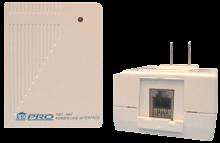
For a long time, the Arduino community had a library (written by Tom Igoe) that would interface the Arduino to the PSC05/TW523 so that it could send X10 commands. (available here) Since I was already wirelessly sending commands via the CM17A, I never took much interest in it.
But then I thought if you could also receive commands with the PSC05/TW523, you could pretty much make your own X10 controller and replace the ActiveHome SW and the CM11A/CM15A hardware.
Again the web provided a lot of the great detail on the protocol that enabled me to write an Arduino driver to receive commands with the PSC05/TW523. I created an example sketch and wrote a lot of background and posted it on the Arduino Playground here. Since the receive driver can coexist with the send library, the Arduino now has a complete interface with the PSC05/TW523 that allows you to send and receive X10 commands.
[3/30/2010] Thanks to Creatrope, a beta of the combined X10 send / receive library is now available - you'll find it here. [1/5/11] Creatrope site down. You can use the separate X10 transmit & receice libs or check out ThomasM's library here.
[
The Playground article should tell you all you need to know about how to use this software, so I won't go into it here. Just to say that the Arduino is always looking for any X10 signal on the powerline at every zero crossing of the AC. When it gets one, it sets a flag, and fills out globals for the House Code, Unit Code, and Command that are used by your program.
With this complete, I was able to make my own X10 controller called the "X10 Book" that I will write about in my next post.
Edit Nov. 2, 09: Based on a comment by Phil, here's a link to an Ap Note from Microchip that describes how to use a PIC to essentially replace the PSC05. It would be great to port it to ATmega chips. Thanks Phil!
Edit Feb. 23, 09: I've received some very good feedback from Johannes related to changing the send and receive software to have reliable communications using 50Hz line frequency. (He uses an "XM10" X10 module instead of the PSC05 / TW523 for 220V 50Hz.) It's simply a matter of changing 4 #defines - 2 in the X10.lib (for sending) and 2 in my code (for receiving).
In the source for your X10.lib, in X10constants.h change:
#define BIT_DELAY from 1778 to 2133
#define BIT_LENGTH from 800 to 900
In my example for the X10 Receive function, in PSC05.h change:
#define OFFSET_DELAY from 500 to 800
Edit Nov. 2, 09: Based on a comment by Phil, here's a link to an Ap Note from Microchip that describes how to use a PIC to essentially replace the PSC05. It would be great to port it to ATmega chips. Thanks Phil!
Edit Feb. 23, 09: I've received some very good feedback from Johannes related to changing the send and receive software to have reliable communications using 50Hz line frequency. (He uses an "XM10" X10 module instead of the PSC05 / TW523 for 220V 50Hz.) It's simply a matter of changing 4 #defines - 2 in the X10.lib (for sending) and 2 in my code (for receiving).
In the source for your X10.lib, in X10constants.h change:
#define BIT_DELAY from 1778 to 2133
#define BIT_LENGTH from 800 to 900
In my example for the X10 Receive function, in PSC05.h change:
#define OFFSET_DELAY from 500 to 800
#define HALF_CYCLE_DELAY from 8334 to 10000
Thanks Johannes! I'm sure others will find this helpful.
Thanks Johannes! I'm sure others will find this helpful.


Sorry if this is a daft question but the code says that it only supports house codes A to F - is this true? If so can it be extended to support the full range as my home setup is using more than this.
ReplyDeleteThanks...r55boy
The PSC05 receive code I put on the Playground (and the X10 send library) supports the full range of housecodes A-P.
ReplyDeleteIt sounds like a typo somewhere but I can't find it. If you can point out where it is, I'll fix it.
Thanks for this. I've given you some free publicity on my blog http://www.cribbstechnologies.com/blog/X10_Arduino.fs
ReplyDeleteBrian,
ReplyDeleteHappy to hear you might find the receive code useful, and thanks for the ack!
Your blog mentioned that someone turned it into a lib. I think your thinking of the CM17A "Firecracker" code I wrote. I *wish* someone would fold this into the existing transmit lib., but I'm happy anyway.
All the best on your project.
Hello ,
ReplyDeleteCould you plesase inform me , if XM10E(Two-Way PLC Interface with European plug type) is compatible with Arduino ? Is there anyone , who has already tested it ?
Here is the link : http://www.eurox10.com/Product/ProfessionalX10/Interfaces/XM10E.htm
Thanks a lot !
I don't have any experience with that device, but a your link shows that it has an RS232 interface. This is different than the PSC05 interface, but the Arduino can easily interface to RS232. The only thing you should watch for is that the the Arduino uses CMOS levels (+5V/0V) for RS232 and the XM10E probably uses PC levels. This means you need a chip like a MAX232 to shift the levels. You may also need a 2nd serial port on the Arduino.
ReplyDeleteGo to the Arduino forum and search for "MAX232" and "Software Serial" to get the details.
Once you have the interface, your code will be different from what I have above. You will need to use the RS232 commands that should be in the manual.
So the short answer is that it should work with the Arduino, but your interface and code will be different.
Please note!
ReplyDeleteAll that stuff about RS232 in my previous post was garbage! I was thrown off by the link to www.eurox10.com.
The XM10E is not RS232. It has the same interface and pinouts as the PSC05. (Thanks Pap)
Hi Brian - great stuff. Have you heard any confirmed reports from someone that has been successful sending/receiving X10 via RF using the XM10E then in the end? (as I'm in Australia on 240V/50Hz & 455MHz).
ReplyDelete(Answered in Arduino Forum - http://www.arduino.cc/cgi-bin/yabb2/YaBB.pl?num=1276569350 )
ReplyDeleteHello, I love the lib, but I ran into a problem. I have a servo connected to digital 6 and 9. When the tw523 is connected and the code is loaded, the servos jitter and do really strange random stuff. Disconnecting the cable makes everything normal.
ReplyDeleteI was troubleshooting for hours as I had a lot on the board: sensor shield, LCD pack on serial, I2C to an other Arduino, and the TW523.
dindiface,
ReplyDeleteI bet this due to the zero crossing interrupt triggering 60 x / sec. To confirm this, try disabling it with detachInterrupt(0). I have to do that with tone(), etc.
However, if this is the problem, fixing it for a servo will be trickier, since they are always getting a signal.
I'm not using the lib myself. It was written based my original function, but this still should be relevant.
BroHogan,
ReplyDeleteYes, thanks a lot, I figured, that it had to do something with interrupts. It however never struck me, that it was 60hz= 60 interrupts/sec. I am actually thinking about separating the X10 stuff onto an other Arduino.. maybe a nano.
I am planning x10+arduinos+lots of sensors for each room, and I will need servos for some cams too.
I also just got an 8 servo serial controller from Pololu so I can continue with the project.
I already have the arduino send x10 events to a java app over UDP, and the arduino relays to X10 from the java app. So now I am getting asterisk's caller id onto the remote serial display ... well in progress..
Either way, your lib helped a lot.... thanks again :)
Amazing work! You have saved me tones of time!
ReplyDeleteBout time you stopped by, cowboy! Thanks Mike, that's nice to hear. You might want to check out the latest post here for info about a new set of Arduino X10 libs written by ThomasM. He used a fresh approach to get PLC Xmit & Rcve as well as RF Rcve.
ReplyDeleteHi, first of all, great work.
ReplyDeleteI am working on a similar project, using ARM. I have procured a XM10 from Marmitek. I am confused about interfacing it with my controller. The XM10 says that it provides a TTL interface whereas my ARM controller is CMOS. So I am wondering if the connections mentioned at the end of the X10 technote will work for me, or if I have to add a level shifter in between.
Thanks in advance!
-Harshad
Thanks Harshad.
ReplyDeleteI'm interfaced to the PSC05 with 5V logic. If your ARM controller is using 5V you will be fine. If it's 3.3V you may need a level shifter - I'm not sure.
Thanks BroHogan!
ReplyDeleteMy ARM controller is 5 V and so I'll be sticking with the way you interfaced it. If my ARM is not able to drive properly then I'll add a transistor circuit.
Just wanted to thank you for your X10 arduino projects. Have my Arduino talking to my PSC05 and an old Honeywell X10 security system, then I have the Arduino connected to my Dockstar ARM Linux server. Really working well with some complex configuration and scheduling.
ReplyDeleteGreat Job on the Blog!
Are there any articles describing how to interface with CM11A?
ReplyDeleteI don't know of any myself, but I seem to remember someone trying to do that. A quick Google search "interfacing to CM11A" gives this -
ReplyDeletehttp://forums.x10.com/index.php?topic=25588.0
Maybe helpful, don't know.
Sorry - don't have any other info.
So with PSC05/TW523 hard to obtain, Alternatives are:
ReplyDelete1. Use CM11A (can add CM17A) still available from http://www.thex10shop.com/.
2. Go "Open" and get XTB-IIR from http://jvde.us/ which, although pricey, is quite high quality and like a TW523 on steroids. Jeff Volp also makes a CM11A compatible interface. Not a controller so no scheduling/RTC, use your own, but still with pretty good signal strength.
Jeff Voip has done it again and come out with an Uber PSC05/TW523 replacement ( http://jvde.us/xtb/XTB-523_description.htm ), the XTB-523. If it performs as well as the XTB-232 (the CM11A equivalent), then it is awesome. It also has repeater capability. What's funny is I've seen regular PSC05/TW523 priced more than this online.
ReplyDeleteThe XTB-523 unlike the TW523 actually needs a 10K pull-up resistor from ZC to +5V. Not a complete drop in replacement but works fine.
DeleteI've been completely satisfied with my 'home automation' for several years now. Consequently I don't get out much anymore regarding X10.
ReplyDeleteHowever I was surprised to see that the PSC05/TW523 have all but disappeared in my absence. Those left seem to sell at scalping prices.
It's good to see that someone has picked it up. I'm sure it must be much better than the original.
Interested in building a X10 relay board that can interpret the X10 codes and activate relays dependent on the specific house code received.
ReplyDeleteCan the receive code accomplish this with some tweaking.
Yes you should be able to write a sketch to do that. See the X10 Book on this blog which does that.
ReplyDelete(I'm not doing X10 anymore so you are on your own as far as details.)
I just saw a way to do this with CM11a and Arduino here:
ReplyDeletehttp://arduino.cc/forum/index.php?topic=162942.0
Hi BroHogan,
ReplyDeleteI'm a student from Singapore. I brought two AM12U appliance module and 1 XM10 adapter from UK Automation and connect up the XM10 RJ11 port to my arduino uno. The examples on this link https://github.com/DougC/arduino-x10 is the code to communicate the arduino with XM10 there was no problem when compiling. I use the AM12U with the house code A to plug into my fan and the XM10 connect to my arduino uno but the fan could not turn on and off. But when i open the serial monitor it shows "On" and "Off" after the delay of 500. I also realize the the XM10 LED is blinking constantly. I'm using 220V - 240V at my country
Please Help
Thank you
Hi Myusic
DeleteI haven't worked with X10 since this project 4 years ago.
I'm afraid I can't help you much. I can only point out the mod above if you are on 50Hz.
You might try the Arduino Forum.
All the best,
John
This comment has been removed by the author.
ReplyDeleteHello friend I am Making a project where I need to send Arduino commands to X-10 devices, but as I live in Brazil'm struggling to get a TW-523 module on time to complete the project. There is another way to make communication between the Arduino and the Protocol X-10?
ReplyDeleteHi Tuane
DeleteNot sure I can help. If you only want to send, there is also the CM17A and a DIY RF receiver - discussed on the this blog.
That's about all I can offer.
The truth now'm just trying to print the code of torque sequence for use in a wave simulator, but how does not have the hardware can not detectaro zero crossing and then the arduino not send the signs by txpin because it is waiting for waitforzerocrossing function () x-10 library, have any idea how can i do to print this sequence of bits through txpin?
DeleteHi Bro,
ReplyDeleteI have a unique issue connecting a PSC05 directly to an Arduino Uno R3 Plus where I do not detect any zero crossing transitions.
To verify the connections and software on the Arduino, I
1. Connect the PSCO5 to a Banjo-8 adapter
2. Connect a RainNet controller to a the other end of the Banjo-8
3. Connect the Arduino board to the exposed connectors on the Banjo-8
Software works perfectly. However, if I connect the 4 lines directly to a PSC05 and the Arduino, nothing. Have you seen this before?
I did make sure the lines had full connectivity just to be sure.
All I can think of is that many phone cables cross over the connections. So your direct connect may be going to the wrong pins on the PSC05.
Delete